JWT Authentication Explained: Access Token vs Refresh Token
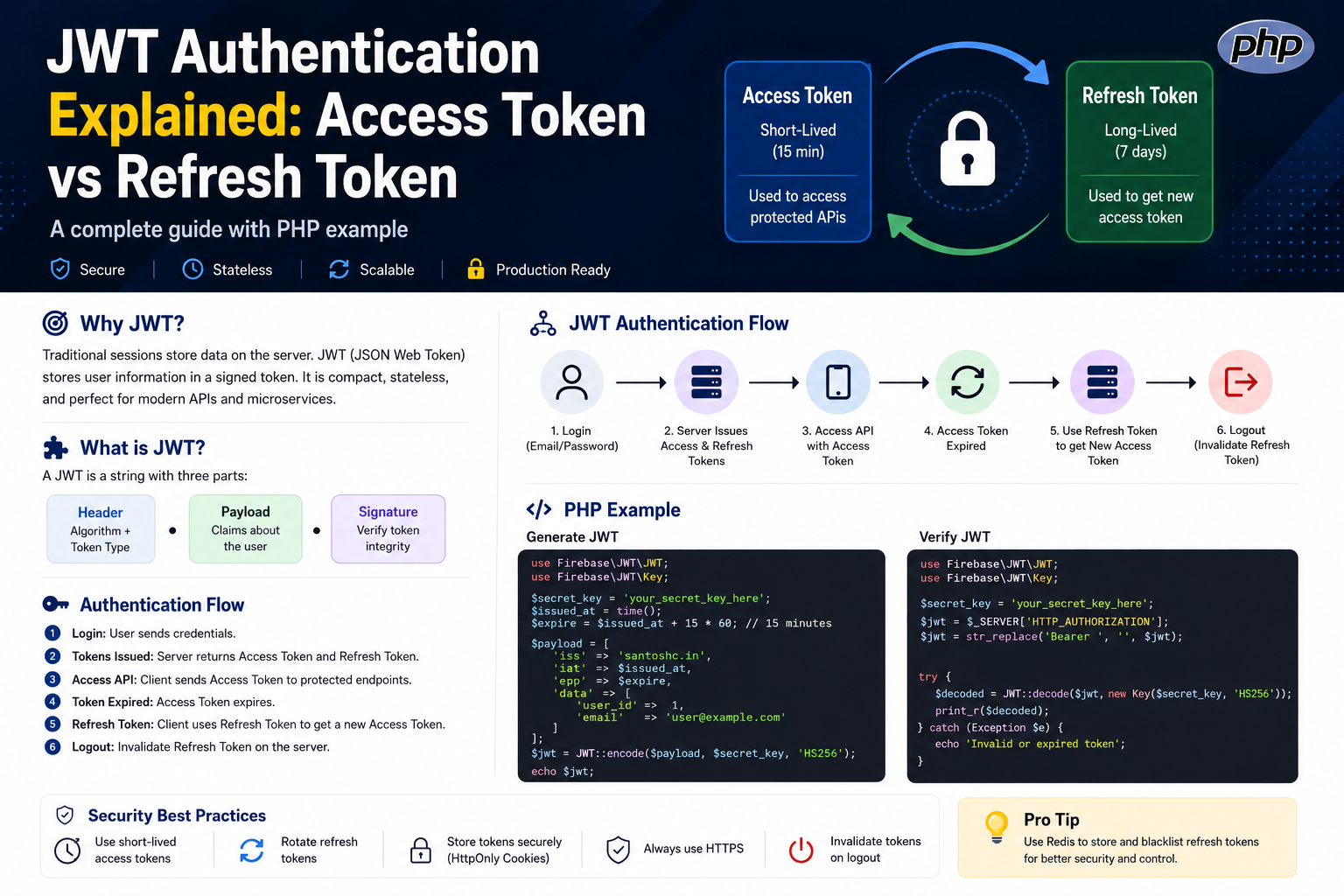
JWT Authentication Explained: Access Token vs Refresh Token
JWT authentication is one of the most common ways to secure modern APIs.
If you have worked with REST APIs, microservices, mobile applications or single-page applications, you have probably seen something like:
Authorization: Bearer eyJhbGciOiJIUzI1NiIs...But what exactly is this token?
Why do we need both an Access Token and a Refresh Token?
And what happens when the access token expires?
Let's understand the complete flow in a simple way.
What Is JWT?
JWT stands for JSON Web Token.
A JWT is a compact, signed token that can contain information about a user or session.
A JWT normally contains three parts:
HEADER.PAYLOAD.SIGNATUREFor example:
eyJhbGciOiJIUzI1NiJ9
.
eyJ1c2VyX2lkIjoxMjMsImV4cCI6MTc1NjAwMDAwMH0
.
SflKxwRJSMeKKF2QT4fwpMeJf36POk6yJV_adQssw5c
1. Header
The header normally contains the signing algorithm and token type.
{
  "alg": "HS256",
  "typ": "JWT"
}
2. Payload
The payload contains claims about the user or token.
{
  "user_id": 123,
  "email": "user@example.com",
  "iat": 1756000000,
  "exp": 1756000900
}
3. Signature
The signature is used to verify that the token has not been modified.
The important point is that JWT payloads are encoded, not encrypted. Do not put passwords or other secrets inside the payload.
Why Do We Need Access and Refresh Tokens?
A common mistake is creating one JWT with a very long expiration time.
For example:
JWT expires in 30 daysIf that token is stolen, an attacker may be able to use it for a long time.
A better approach is to use two tokens:
- Access Token — short-lived and used to access APIs.
- Refresh Token — longer-lived and used to obtain a new access token.
Access Token
The access token is sent with API requests.
GET /api/profile

Authorization: Bearer <access_token>
Keep the access token relatively short-lived.
For example:
Access Token
Lifetime: 15 minutes
If the access token is stolen, the attacker's window of opportunity is reduced.
Refresh Token
When the access token expires, the user doesn't necessarily need to log in again.
The client can send the refresh token to the authentication server.
POST /api/auth/refresh

{
  "refresh_token": "..."
}
The server validates the refresh token and issues a new access token.
New Access Token
        ↓
Use APIs again
        ↓
Eventually expires
        ↓
Use Refresh Token
        ↓
Get another Access Token
Complete Authentication Flow
Client
   |
   | 1. Login
   v
Authentication Server
   |
   | 2. Access Token + Refresh Token
   v
Client
   |
   | 3. API Request + Access Token
   v
API Server
   |
   | 4. Access Token expires
   v
Client
   |
   | 5. Refresh Token
   v
Authentication Server
   |
   | 6. New Access Token
   v
Client
PHP Example: Creating a JWT
One popular PHP library for JWT handling is firebase/php-jwt.
After installing the package:
composer require firebase/php-jwtA simple JWT creation example:
<?php

use Firebase\JWT\JWT;

$secretKey = 'your-secret-key';

$issuedAt = time();
$expiresAt = $issuedAt + (15 * 60);

$payload = [
    'iss' => 'santoshc.in',
    'iat' => $issuedAt,
    'exp' => $expiresAt,
    'user_id' => 123,
    'email' => 'user@example.com'
];

$jwt = JWT::encode(
    $payload,
    $secretKey,
    'HS256'
);

echo $jwt;
The important part here is the expiration time.
$expiresAt = $issuedAt + (15 * 60);This makes the access token valid for approximately 15 minutes.
PHP Example: Validating a JWT
When the client calls a protected API, the server can read the Authorization header.
<?php

use Firebase\JWT\JWT;
use Firebase\JWT\Key;

$secretKey = 'your-secret-key';

$header = $_SERVER['HTTP_AUTHORIZATION'] ?? '';

$jwt = str_replace('Bearer ', '', $header);

try {

    $decoded = JWT::decode(
        $jwt,
        new Key($secretKey, 'HS256')
    );

    echo json_encode([
        'success' => true,
        'user' => $decoded->user_id
    ]);

} catch (Exception $e) {

    http_response_code(401);

    echo json_encode([
        'success' => false,
        'message' => 'Invalid or expired token'
    ]);
}
What Happens When the Access Token Expires?
Suppose the access token expires after 15 minutes.
The API can return:
HTTP/1.1 401 UnauthorizedThe client can then call the refresh endpoint:
POST /api/auth/refreshThe server validates the refresh token and returns a new access token.
The user can continue using the application without logging in again.
Where Should Refresh Tokens Be Stored?
This is an important security consideration.
For browser applications, a common secure approach is to store refresh tokens in an HttpOnly, Secure cookie.
For example:
Set-Cookie:
refresh_token=abc123;
HttpOnly;
Secure;
SameSite=Strict
HttpOnly prevents normal JavaScript code from directly reading the cookie.
Secure ensures the cookie is sent only over HTTPS.
Refresh Token Rotation
For stronger security, refresh tokens can be rotated.
Instead of repeatedly using the same refresh token:
Refresh Token A
      ↓
New Access Token
      ↓
Refresh Token A
the server can issue a new refresh token each time:
Refresh Token A
      ↓
New Access Token
      +
Refresh Token B
      ↓
Invalidate Refresh Token A
This makes stolen refresh tokens harder to reuse.
Where Does Redis Fit?
JWT access tokens are often designed to be stateless, which means the API doesn't need to query the database for every request.
However, refresh tokens are different.
You may want the ability to revoke them immediately.
Redis can be useful for storing refresh-token state.
Refresh Token
      |
      v
Redis
      |
      +-- User ID
      +-- Token ID
      +-- Expiration
      +-- Revoked?
      |
      v
Authentication Server
This gives you much better control over logout, token revocation and refresh-token rotation.
JWT Security Best Practices
- Use HTTPS everywhere.
- Keep access tokens short-lived.
- Use strong signing keys.
- Never store passwords inside JWT payloads.
- Validate token expiration.
- Validate the signing algorithm.
- Protect refresh tokens carefully.
- Rotate refresh tokens when appropriate.
- Support logout and token revocation.
- Keep secrets outside source code.
Simple Mental Model
LOGIN
  |
  v
Access Token + Refresh Token
  |
  +----------------------+
  |                      |
  v                      v
Access APIs          Wait...
  |                      |
  v                      v
Token Expires       Refresh Token
                         |
                         v
                   New Access Token
                         |
                         v
                    Access APIs
Final Thoughts
JWT authentication becomes much easier to understand when you separate the responsibilities of the two tokens.
Access Token:
Short-lived
Used for API requests
Limits the damage if stolen
Refresh Token:
Longer-lived
Used to obtain new access tokens
Should be stored and protected carefully
A practical architecture for many modern applications is:
Login
  ↓
Access Token + Refresh Token
  ↓
API Requests
  ↓
Access Token Expires
  ↓
Refresh Token
  ↓
New Access Token
  ↓
Continue Using API
JWT is not automatically secure just because it is a JWT. The security comes from how you generate, validate, store, expire, rotate and revoke your tokens.
For production applications, those details matter much more than simply generating a token.
Author: Santosh Chakraborty
Topics: JWT, PHP, REST API, Authentication, Access Token, Refresh Token, Redis, Backend Development