How I Built a Local LLM App with Ollama, Qwen2.5 & PHP — Step by Step 🤖
Introduction
Large Language Models are becoming part of almost every modern application. However, using cloud-based AI APIs can become expensive when an application starts processing a large amount of data. In this article, I will explain how I built a local LLM application using Ollama, Qwen2.5, PHP, Redis and MySQL. The biggest advantage of this architecture is that the LLM can run locally without sending application data to an external AI provider.
Why Run an LLM Locally?
Running an LLM locally provides several advantages:
- Privacy: Sensitive application data can remain inside your infrastructure.
- Cost control: There is no per-request API cost.
- Control: You can choose and change the model whenever required.
- Customization: You can build your own prompts, RAG pipelines and evaluation systems.
- Offline capability: The application can continue working without depending completely on an external AI API.
Technology Stack
- Ollama – Runs the LLM locally.
- Qwen2.5 – Open-source language model.
- PHP – Backend API and application logic.
- Redis – Caching and queue processing.
- MySQL – Application and structured data storage.
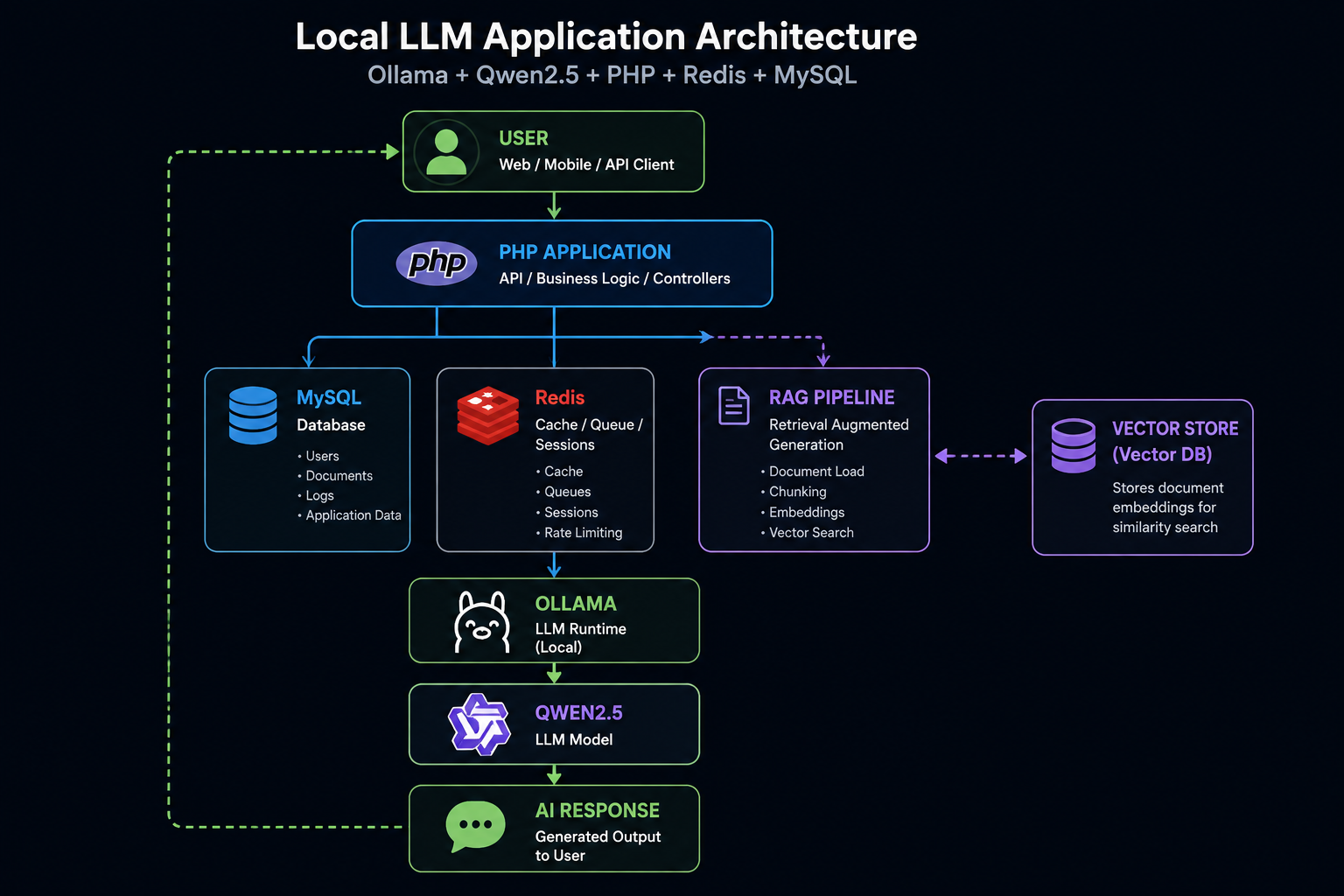
Basic Architecture
The application follows a simple architecture:
User
  |
  v
PHP Application
  |
  +---- MySQL
  |
  +---- Redis
  |
  v
Ollama
  |
  v
Qwen2.5
  |
  v
AI Response
Step 1: Install Ollama
Ollama makes it very easy to run LLMs locally.
After installing Ollama, you can download a model such as Qwen2.5.
ollama pull qwen2.5:7b
You can then test the model directly:
ollama run qwen2.5:7b
Once the model is running, Ollama exposes an API that can be consumed by your application.
Step 2: Connect PHP with Ollama
From PHP, we can send a request to the Ollama API.
$payload = [
    'model' => 'qwen2.5:7b',
    'prompt' => 'Explain dependency injection in PHP.',
    'stream' => false
];

$ch = curl_init('http://localhost:11434/api/generate');

curl_setopt($ch, CURLOPT_POST, true);
curl_setopt($ch, CURLOPT_POSTFIELDS, json_encode($payload));
curl_setopt($ch, CURLOPT_HTTPHEADER, [
    'Content-Type: application/json'
]);

curl_setopt($ch, CURLOPT_RETURNTRANSFER, true);

$response = curl_exec($ch);

curl_close($ch);

$result = json_decode($response, true);

echo $result['response'];
Now your PHP application can communicate directly with the local LLM.
Step 3: Add Redis
LLM requests can sometimes take several seconds depending on the model and hardware.
Redis can be used for caching, queues and temporary processing.
For example, frequently requested responses can be cached instead of sending the same request to the LLM repeatedly.
Step 4: Add RAG
A basic LLM only knows what was included in its training data and what we provide in the prompt.
Retrieval-Augmented Generation, or RAG, allows us to provide the model with information from our own documents and databases.
Documents
    |
    v
Chunking
    |
    v
Embeddings
    |
    v
Vector Database
    |
    v
Relevant Context
    |
    v
Qwen2.5
    |
    v
Answer
This is particularly useful for applications such as:
- Resume analysis
- Interview evaluation
- Document search
- Company knowledge assistants
- JD and resume matching
- Internal knowledge bases
Local LLM vs Cloud LLM
| Feature | Local LLM | Cloud API |
|---|---|---|
| Data privacy | High | Depends on provider |
| API cost | No per-request API cost | Usually usage based |
| Infrastructure | Managed by you | Managed by provider |
| Model control | High | Limited |
| Scaling | Your responsibility | Usually easier |
Important Considerations
Running an LLM locally does not mean infrastructure is free.
You still need sufficient RAM, CPU/GPU resources, disk space and proper monitoring.
Model size also matters. A larger model generally requires more memory and processing power.
For many practical applications, starting with a smaller model and optimizing the prompts and retrieval pipeline can be more effective than immediately moving to a very large model.
Conclusion
Building a local LLM application is no longer limited to large AI companies.
With tools such as Ollama and Qwen2.5, developers can build useful AI applications while maintaining greater control over their infrastructure and data.
My preferred architecture is to keep the traditional application stack — PHP, MySQL and Redis — and introduce the LLM as an additional AI service.
This approach makes it easier to gradually add AI capabilities without rewriting the entire application.
What's Next?
In the next article, I will explain how to build a complete RAG pipeline with document chunking, embeddings, vector search and Qwen2.5.